What Is a 3MF File?
Quick Summary
- Definition
- A 3MF file is a 3D Manufacturing Format package for storing 3D printing model data in a structured container.
- What it can contain
- 3MF can describe mesh geometry, objects, relationships, colors, materials, textures, thumbnails, metadata, and print-oriented project information.
- How it relates to STL
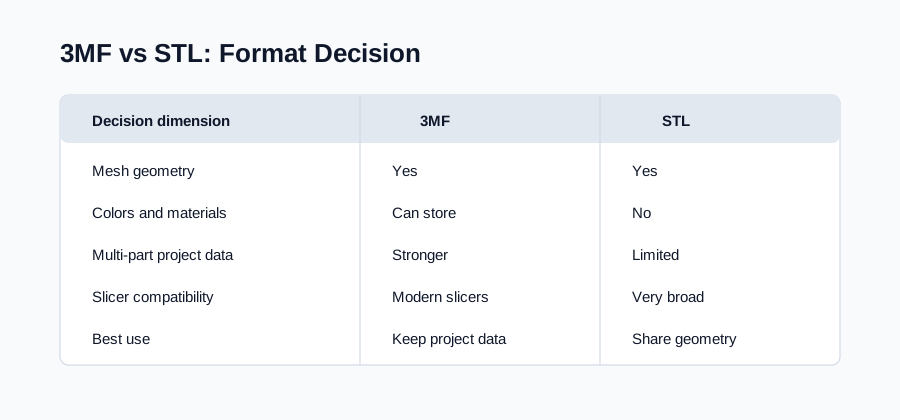
- STL stores mesh geometry only. 3MF can carry richer project data, so converting 3MF to STL is a compatibility export.
A 3MF file is a 3D printing container format. Unlike STL, which mainly stores triangle geometry, 3MF can package the model and related print information together. That makes it useful as a master project file when you want more than a bare mesh.
What 3MF Means
3MF stands for 3D Manufacturing Format. It was designed to address practical limitations of older mesh-only formats in 3D printing workflows. Instead of storing only triangles, 3MF can store a structured model description and additional resources in a package.
In practical terms, a 3MF file can behave like a project container. It may include one or more model objects, mesh data, object relationships, units, colors, materials, textures, thumbnails, and metadata. The exact contents depend on the application that created the file.
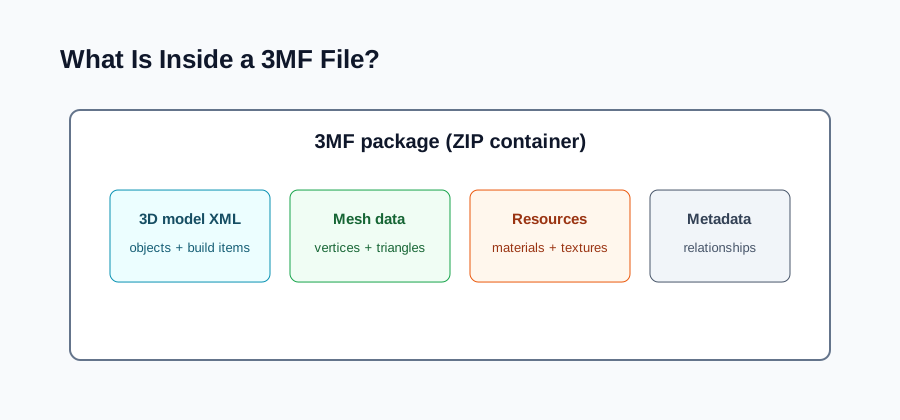
What Is Inside a 3MF File?
A 3MF file is commonly packaged as a ZIP container. Inside that package, the model is described with XML files and supporting resources. The converter reads the 3D model data, extracts mesh vertices and triangle faces, then prepares STL output from the geometry.
The important point is that not everything inside 3MF has an equivalent in STL. Mesh geometry maps well to STL. Rich project data does not.
How Apps Use 3MF in Practice
Slicers and design tools often use 3MF as a project handoff format rather than only a mesh file. A 3MF package can keep multiple objects together, remember how parts relate to one another, and carry extra context that helps a printing workflow reopen the model with more of its setup intact.
That does not mean every 3MF file contains every possible field. Some 3MF files are simple and mostly store mesh geometry. Others include richer resources such as colors, materials, textures, object relationships, thumbnails, or printer-oriented settings. The safest assumption is to inspect the file before treating STL export as equivalent.
For conversion, this distinction matters. If the 3MF only contains one plain mesh, STL may be a suitable compatibility copy. If the 3MF behaves like a full print project, exporting to STL should be a deliberate handoff step, not a replacement for the source package.
3MF vs STL in One Sentence
3MF is better when you need a richer 3D printing project file. STL is better when you need a simple geometry file accepted by many tools.
When You Might Convert 3MF to STL
Convert 3MF to STL when the destination tool, slicer, print service, marketplace, or CAD handoff expects STL. STL remains a practical compatibility format because many tools can read it even if they do not support the full 3MF feature set.
Before converting, decide whether the output should be one merged STL or separate STL parts. A multi-object 3MF may need split export if the objects should remain independent in the slicer.
Also check whether the receiving workflow needs only geometry or expects the original print setup. If the next step is a quick compatibility upload, STL is usually enough. If another user needs to reopen the project with the same object structure or material intent, share the 3MF as the source and export STL only as an additional copy.
When You Should Keep 3MF
Keep 3MF when the file is still your master print project. If colors, materials, textures, object relationships, metadata, build-plate setup, or slicer-specific information matters, the 3MF file should remain the authoritative source.
You can still export STL as a compatibility copy. Just avoid treating STL as a full replacement for 3MF when the richer data matters.
FAQ
Is a 3MF file just a renamed ZIP file?
3MF is packaged like a ZIP container, but it follows a specific 3D Manufacturing Format structure. The package contains model XML and related resources rather than arbitrary files.
Is 3MF better than STL for 3D printing?
3MF is better for preserving full project data. STL is better for simple mesh compatibility. If your slicer supports 3MF and you need project details, keep 3MF; if you need broad geometry exchange, export STL.
Can every 3MF file be converted to STL?
Readable mesh geometry can usually be exported as STL. However, STL will not carry 3MF colors, materials, textures, metadata, or build-plate settings, and conversion will not repair broken source geometry.
Why does STL lose information from 3MF?
STL only has a simple structure for triangle geometry. It does not include fields for most 3MF project data, so those properties cannot be represented in a standard STL output.