3MF vs STL: Which Format Should You Use?
Quick Summary
- Page type
- Comparison page for deciding between 3MF and STL in 3D printing workflows.
- Short answer
- Use 3MF when you need to preserve a richer print project. Use STL when you need broad geometry compatibility.
- Conversion impact
- Converting 3MF to STL keeps mesh geometry but drops 3MF-specific color, material, texture, metadata, and project data.
3MF and STL are both common in 3D printing, but they solve different problems. 3MF is a modern container format that can describe a richer printing project. STL is a widely supported geometry format that many slicers, printers, marketplaces, and CAD handoff workflows can read.
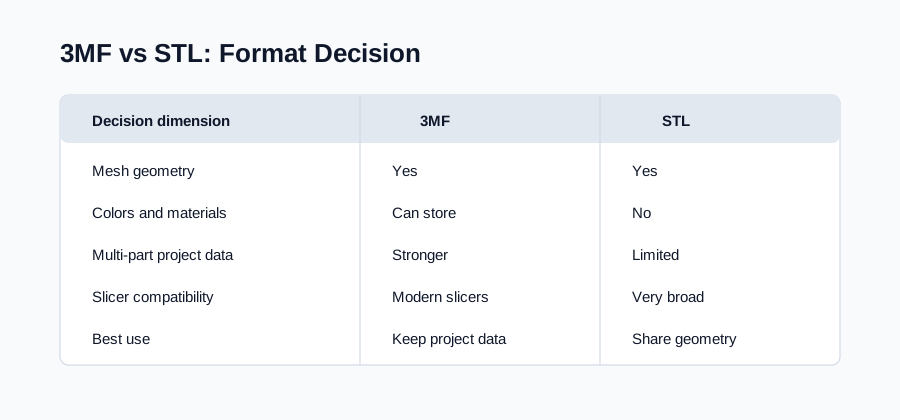
TL;DR Decision
Keep 3MF when you need color, material, texture, metadata, object relationships, or slicer-oriented project information. Export STL when the receiving tool only needs mesh geometry or when broad compatibility matters more than keeping every 3MF property.
The decision is not “which format is universally better.” The decision is whether your next workflow needs a complete print project or a compatible mesh.
3MF vs STL Comparison Table
| Dimension | 3MF | STL |
|---|---|---|
| Primary role | Modern 3D printing container | Mesh geometry exchange |
| Geometry | Stores mesh data | Stores triangle mesh data |
| Colors and materials | Can store them | Not supported |
| Textures | Can reference them | Not supported |
| Multi-part assemblies | Better support | Limited, usually separate files or one merged mesh |
| Metadata | Can carry richer data | Minimal |
| Slicer compatibility | Good in modern slicers | Very broad |
| Best use | Preserve a print project | Share geometry with many tools |
When to Choose 3MF
Choose 3MF when the file is still your master print project. 3MF is the better choice when you need to preserve object organization, colors, materials, textures, thumbnails, printer-specific settings, or richer metadata.
3MF is also useful when you expect to return to the file later and keep editing the print setup. If the receiving slicer supports 3MF well, there is often no reason to flatten the file into STL.
When to Choose STL
Choose STL when the next tool expects a simple mesh. STL remains useful because support is broad and predictable. Many slicers, model marketplaces, print services, and CAD handoffs accept STL even when they do not support the full 3MF feature set.
STL is also the practical target when you only need geometry. If color and material data are irrelevant, STL can be a clean compatibility copy.
Common Conversion Scenarios
Export STL for a marketplace upload when the listing only accepts geometry and asks buyers to choose their own slicer settings. In that case, the STL file acts as a neutral handoff format, while the richer 3MF source remains your editable project copy.
Export separate STL files when a 3MF contains multiple independent objects that need different placement, orientation, material assignment, or print settings. Export one merged STL only when the downstream workflow expects the object to behave as a single mesh.
Keep 3MF as the working file when you are sharing a print setup with another user of the same slicer or printer ecosystem. The extra project information can be useful for reproducing a setup, while STL should be treated as a compatibility export for tools that do not need that context.
What Changes During 3MF to STL Conversion
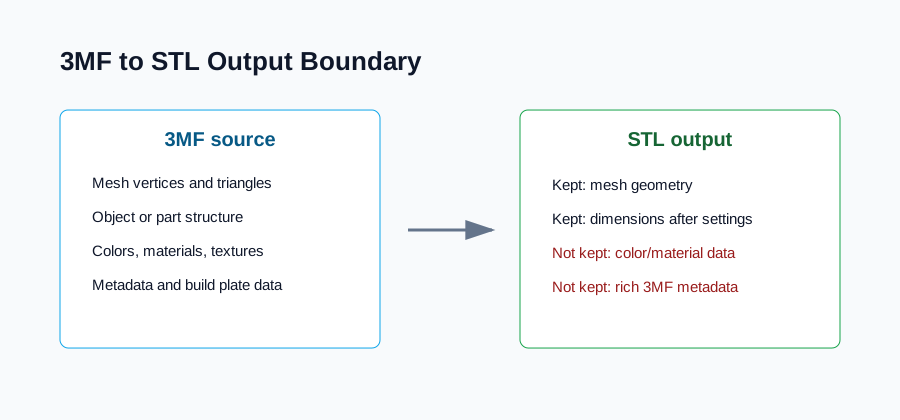
During 3MF to STL conversion, the mesh is extracted and written as STL triangles. The output can preserve dimensions and shape when the conversion settings are correct. It cannot preserve 3MF color, material, texture, metadata, thumbnail, or build-plate information because STL has no place to store those properties.
If those lost properties affect the final print, keep the original 3MF and treat STL as a secondary compatibility file.
Should You Convert 3MF to STL?
Convert 3MF to STL when your receiving workflow cannot read 3MF or when you need a geometry-only file for sharing, slicing, inspection, or handoff. Do not convert when 3MF is accepted and you still need the richer project data.
If you decide to convert, use the 3MF to STL converter to preview the model first. For multi-part files, decide whether the target workflow needs one merged STL or separate STL files in a ZIP.
FAQ
Is 3MF better than STL?
3MF is better for preserving a richer 3D printing project. STL is better for broad geometry compatibility. The better format depends on whether your next workflow needs project data or only mesh geometry.
Does STL preserve 3MF colors and materials?
No. STL does not preserve colors, materials, textures, thumbnails, or rich metadata from 3MF. It stores triangle geometry, so color-aware or material-aware projects should keep the 3MF source file.
Why do people still use STL?
STL is simple and widely supported. Many tools can import STL reliably, so it remains useful for compatibility even though it carries less information than 3MF.
When should I keep both 3MF and STL?
Keep both when 3MF is your editable master file and STL is needed for a specific slicer, marketplace, print service, or compatibility handoff. This gives you a rich source file and a broad-use geometry copy.